Preservation vs. Access: Understanding the Difference
In conversations about digitization, two words surface again and again: preservation and access. They are two sides of the same coin, and understanding the preservation vs. access distinction is essential for any organization responsible for safeguarding information, history, or institutional memory.
Whether you are responsible for archival collections, government records, academic libraries, or corporate documents, long-term success depends on finding the right balance between the two. Preservation ensures that materials will be available for future generations, while access allows people to use and learn from them today. The most effective digitization strategies recognize that these goals support one another.
What Is Preservation?
Preservation focuses on longevity and protection. Its purpose is to make sure that both physical and digital materials remain authentic, stable, and usable for many years to come.
In digitization projects, preservation means creating high-quality master files and protecting original materials from unnecessary handling or environmental risks. This work is intentional and long-term, and the choices made at this stage will shape the lifespan and integrity of your collections well into the future.
Preservation activities often include:
- Climate-controlled storage for physical media
- Conservation or stabilization of fragile materials
- High-resolution, archival-quality imaging
- File format standardization (such as TIFF or PDF/A)
- Redundant storage and backup strategies
- Maintaining documentation about file creation, storage, and any changes over time
- Quality assurance and color accuracy verification
Fidelity is at the heart of preservation. The aim is not convenience or speed, but accuracy and durability. Preservation files are typically larger, more detailed, and less compressed because they are meant to serve as the most faithful digital version of the original item.
What Is Access?
Access, on the other hand, is about usability and discoverability. It concerns how people interact with information—how easily they can find, search for, share, and use it.
While preservation safeguards materials, access is what brings them to life. The needs of users and the goals of the organization shape access efforts, whether the aim is to support research, improve efficiency, or share cultural heritage with the public.
Access activities commonly include:
- Metadata creation and indexing
- Optical Character Recognition (OCR) for full-text search
- Digital repositories and content management systems
- Web portals and public collection interfaces
- Document management systems for internal use
- Derivative file creation for faster download and viewing
Where preservation is measured in decades, access is often evaluated by how immediate and engaging it is. How quickly can someone find a record? Is the interface intuitive? Does the system support the way people work?
Access files are usually smaller and optimized for speed and compatibility. They are not meant to replace preservation masters, but to be used in everyday work.
Key Differences at a Glance
| Preservation | Access |
|---|---|
| Focuses on longevity and protection | Focuses on usability and discoverability |
| Serves archivists and custodians | Serves researchers, staff, and the public |
| Uses high-resolution master files | Uses optimized derivative files |
| Long-term time horizon | Immediate and short-term goals |
| Measures integrity and stability | Measures engagement and efficiency |
Both preservation and access are essential, but they address different needs. Preservation asks whether something will still be usable in thirty years. Access asks if someone can find and use it today.
Why You Need Both
Despite the ‘preservation vs. access’ framing, the two are not competing priorities. They are complementary parts of responsible information management.
If preservation is prioritized without access, collections may be safe but remain underused. Valuable resources can end up hidden or difficult to reach.
On the other hand, focusing on access without preservation may increase visibility in the short term, but it introduces long-term risks. Files can degrade, formats may become obsolete, and authenticity may be lost.
A balanced approach assures that materials are both protected and useful. Digitization projects that focus on only one side often require costly corrections later, such as rescanning materials, rebuilding metadata, or migrating unstable files.
Planning for both preservation and access from the start saves time, protects budgets, and leads to better results.
Common Misconceptions
Several persistent myths can derail digitization planning:
“If it’s digitized, it’s preserved.”
Digitization alone does not equal preservation. Resolution, color depth, file format, and storage practices all determine whether a digital file will stand the test of time.
“Access copies are good enough for long-term storage.”
Compressed or low-resolution files may be useful for quick viewing, but they are not suitable as archival masters.
“Metadata is optional.”
Without metadata, access systems become less effective, and collections are harder to navigate.
“One scan fits all purposes.”
Preservation and access often require different file types. It is rare for a single file to meet both needs equally well.
Practical Planning Tips
Organizations that succeed in both preservation and access typically share a few common practices:
- Define standards early. Establish resolution, color accuracy and file format requirements before scanning begins.
- Understand user needs. Access platforms ought to align with how people will search, retrieve and use information.
- Invest in metadata. Structured, consistent metadata dramatically improves discoverability and efficiency.
- Stress quality assurance. Early QA prevents expensive rescanning and data correction later.
- Plan for storage and redundancy. Digital preservation depends on reliable backups, frequent integrity checks, detailed documentation, and planned migration strategies to ensure files remain accessible as technology changes.
- Reevaluate periodically. Technology and user expectations evolve; workflows should too.
Strategy in Action
A real-world example of preservation vs. access working in balance can be seen in Belmont University’s Special Collections. Among the diverse collections are handmade scrapbooks, yearbooks, news clippings, and other artifacts that chronicle student and staff life at Belmont. Using a Zeutschel OS C overhead book scanner purchased from The Crowley Company, their goals are twofold: to preserve fragile originals through high-quality digital surrogates and to make these invaluable resources accessible to students, researchers, and the wider public.
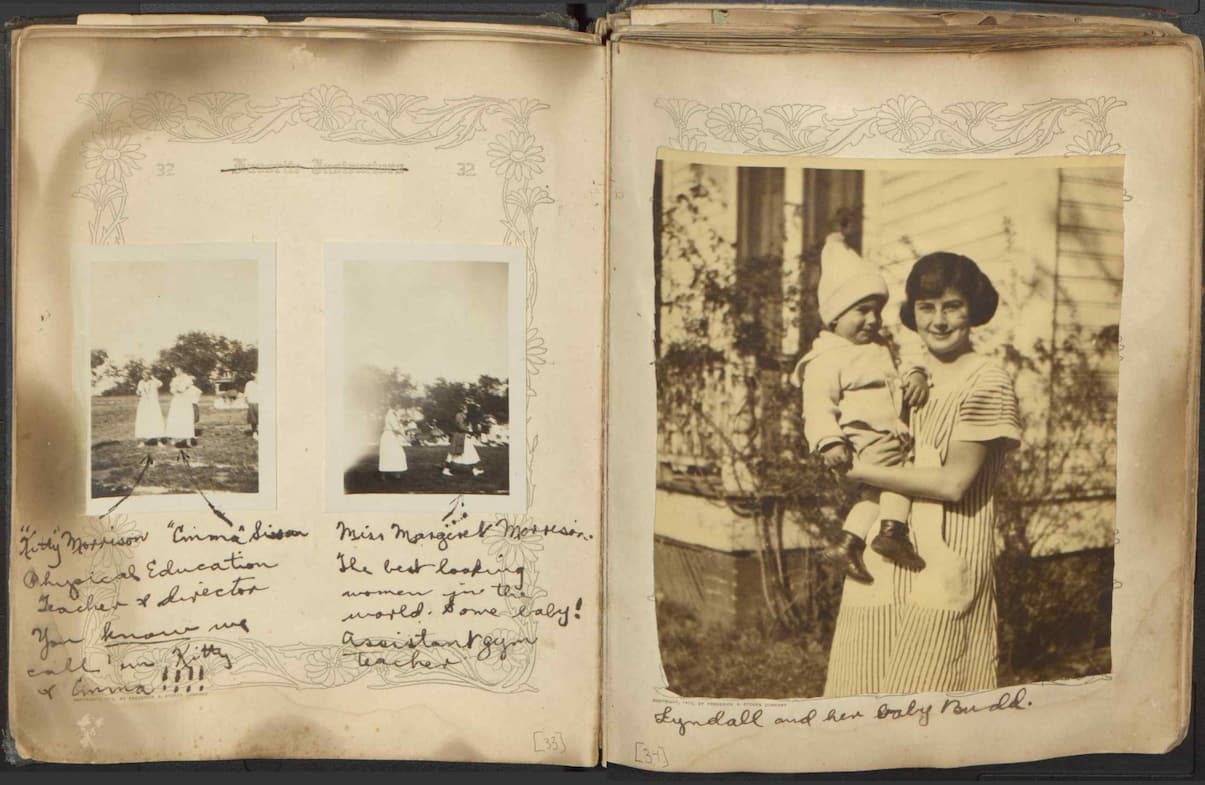
Belmont’s special collections manager, Molly Randolph, is managing the digitization process from start to finish. With the Zeutschel scanner and Omniscan software, they handle scanning, image optimization, and creation of both archival-quality preservation files and web-friendly access files. This approach allows them to tailor workflows and standards to each collection’s unique needs, ensuring long-term accessibility and authenticity.
The results speak for themselves: Belmont’s digitized collections are now available to a broader audience, supporting research, teaching, and institutional memory. Their success demonstrates how the right tools empower organizations to achieve both preservation and access, bringing unique archival materials to life for current and future generations.
In the End
Preservation and access are two sides of the same responsibility. One protects the integrity of information for the future. The other unlocks its value today.
Organizations that treat preservation and access as interconnected, rather than interchangeable, build digitization programs that are resilient, efficient, and meaningful. By investing in both high-quality preservation and thoughtful access strategies, collections remain secure, discoverable, and relevant for generations.