
Metadata in Digitization Projects: Types, Standards, and Best Practices
Metadata in digitization projects is a critical element that most people overlook. Without well-structured metadata, digitized collections quickly become difficult to manage, search, and reuse. Metadata enables organizations to locate files, understand how they were created, and maintain the integrity of digital assets over time.
For archives, libraries, museums, and corporate records departments, consistent metadata ensures that digital collections remain searchable, organized, and usable long after the original digitization project is complete.
Understanding Metadata in Digitization Projects
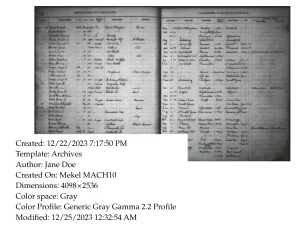
At a high level, there are two types of metadata commonly used in digitization projects: descriptive metadata and technical metadata.
Descriptive metadata is used to identify the content of an item, including fields such as title, creator, date, and keywords. Technical metadata is used to identify the technical attributes of how a file was created. This may include creation and modification dates, file types, file formats, resolution, scanner settings, and camera settings. Cameras and scanners also generate device-specific technical metadata that is embedded directly into the electronic file. In some cases, this may also include GPS data.
Metadata Standards and File Organization
Metadata can be as simple as creating an Excel spreadsheet or CSV file containing your desired field names, or you can follow established standards such as Dublin Core (DC) or Encoded Archival Description (EAD). Most Integrated Library Systems, Document Management Systems, and Digital Asset Management systems can easily ingest these spreadsheets and associate them with your digitized content.
In some cases, you may want to insert or embed both descriptive and additional technical metadata directly into the digital files themselves, such as TIFF, JPG, JP2, and PDF. When metadata is embedded within a file, it becomes a permanent part of the digital object. This means that even if the system storing the files becomes obsolete, crashes, or the files are moved outside the system, the digital file and its embedded metadata remain intact and can even be used to recreate a new database.
Adding and Managing Metadata
Metadata can be added, removed, or modified at multiple points in the workflow using pre- and post-processing software such as Photoshop, Bridge, ExifTool, Capture One, OmniScan, Adobe Acrobat, and many others. Metadata—or “tags”—are embedded into different parts of an image file header or within XML structures depending on the file type.
There are many standard metadata tags available. ExifTool.org is an excellent resource for learning about tag names and where those tags reside. EXIF, IPTC, and XMP are among the most common metadata standards, although many camera manufacturers also maintain their own device-specific metadata structures.
Planning Metadata Before a Project Begins
Before starting a digitization project, it is important to document the metadata fields you require. This can sometimes be confusing because field names may be duplicated or slightly different across metadata standards. In addition, your software may use its own “display” titles that differ from the underlying metadata field names in the source file.
The best way to ensure your metadata is stored exactly where you want it is to run test files and review how the metadata appears within your system. When Crowley’s Service Bureau performs digitization services, we may ask you to open a sample file in Photoshop, Bridge, or Adobe Acrobat, manually enter the desired metadata, and provide a screenshot. This allows us to confirm precisely where and how the metadata should be embedded.
Crowley also has tools that can extract and export all existing metadata from a digital file into a CSV, TXT, or Excel file. This allows us to review every field in its native format, independent of how individual software applications display or label the metadata.
Build Strong Metadata in Digitization Projects
Digitization projects often involve complex metadata requirements, particularly when collections must integrate with archival systems, digital repositories, or enterprise content management platforms. Careful planning, testing, and validation help ensure metadata is applied consistently and stored correctly for long-term access and preservation.
Organizations planning large-scale digitization initiatives benefit from working with experienced partners who understand how metadata standards, file formats, and digitization workflows interact. To learn how Crowley can help you with you metadata click here!
Author:
 Kevin Kapel
Senior Project Manager, The Crowley Company
With more than 30 years in the industry and experience spanning 5,000+ unique projects, Kevin has helped engineer solutions that improve quality, reduce costs, and solve the “seemingly impossible.” From developing software tools we use daily in our service bureau to supporting both sales and operations as our very own “Swiss Army knife,” his impact is felt across the entire organization.